
Sleeping Voice Recorder LITE1.0 - Google Play
You'll be able to see results in few seconds.
Publisher Description
Sleeping Voice "Recorder" let you start voice recording
in less than 0.4 seconds!
by simply turning off the screen to start the "Voice" Recorder.
"Record" in the
QUICKEST
way possible! ideas, thoughts, events, memos and even take notes on the fly when needed.
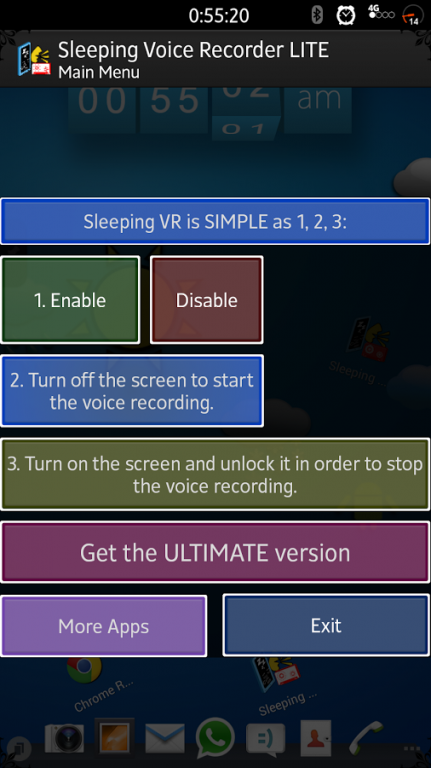
It's as SIMPLE as 1, 2, 3:
1. Enable Sleeping "Voice" Recorder.
2. Turn off the screen to start the "Voice Recording".
3. Turn on the screen and unlock it to have the "Recording" stopped and saved to your device.
DISCLAIMER:
Sleeping "Voice Recorder" was built on an actual android device AND have been tested on many android devices in order to achieve maximum compatibility for android devices all over the world for people in need for this productive & Educational app!
No android emulators were used in the making of Sleeping "Voice Recorder".
TERMS OF USE:
Be advised that recording another person's voice without their knowledge may be illegal.
Sleeping Voice Recorder app and its affiliates do not take any responsibility for the content of any voice recording that occur on your device and its uses.
This app intentions is to have a quick reliable voice recorder for thoughts, ideas and brainstorming you want to save as voice notes.
Negative feedback will not resolve your issue; Communication will !
LITE version limitations:
-Recording will have a size limit of 60K = 30-120 seconds of recording (varies on devices)
-No built-in player for the recordings. You can listen to them with any music app on your device.
ULTIMATE version capabilities:
-Unlimited recording length*
-Built in player in the app to listen to the recordings.
*Recordings may stop if the following happens:
-Any app that will need to use the microphone will stop the recording.
-Any app that turns on the screen will stop the recording.
-if your device is low on resources like CPU or RAM the recording may stop (this applies only for low end phones when tested).
-If your device needs more resources to do another task while on standby the recording may have its priority lowered by android thus stopping and saving the recording.
-RARE: Some devices may stop the Recording if very low or no audio at all is being picked up by the microphone for a long period of time.
Note:
When the screen turn off automatically the device will start recording as well; will soon be adding an option to QUICKLY enable and disable Sleeping "Voice Recorder" service.
Press Release:
GetNews.jp: http://getnews.jp/archives/486556
Enjoy!
Email for feedback and expect new features added to Sleeping "Voice Recorder"
Keywords & Tags: Recorder, Recording, Voice, Notes, Memo, Notepad, Listen, Speech, Accessibility, Text to Speech, Tape, Voice Reading, Voice Reader.
About Sleeping Voice Recorder LITE
The company that develops Sleeping Voice Recorder LITE is Technology Discovery. The latest version released by its developer is 1.0.
To install Sleeping Voice Recorder LITE on your Android device, just click the green Continue To App button above to start the installation process. The app is listed on our website since 2014-01-01 and was downloaded 0 times. We have already checked if the download link is safe, however for your own protection we recommend that you scan the downloaded app with your antivirus. Your antivirus may detect the Sleeping Voice Recorder LITE as malware as malware if the download link to com.sleepingvoicerecorderlite is broken.
How to install Sleeping Voice Recorder LITE on your Android device:
- Click on the Continue To App button on our website. This will redirect you to Google Play.
- Once the Sleeping Voice Recorder LITE is shown in the Google Play listing of your Android device, you can start its download and installation. Tap on the Install button located below the search bar and to the right of the app icon.
- A pop-up window with the permissions required by Sleeping Voice Recorder LITE will be shown. Click on Accept to continue the process.
- Sleeping Voice Recorder LITE will be downloaded onto your device, displaying a progress. Once the download completes, the installation will start and you'll get a notification after the installation is finished.
Program Details
System requirements
Download information
Pricing
Version History
version 1.0
posted on 2014-01-01
Please uninstall the LITE version when upgrading to the ULTIMATE version.,V1.0 - First stable version.,To do list:,-Add an option to QUICKLY Enable/Disable the service.,-Add an option to continue recording when turning the screen on.
Disclaimer
Official Google Play Link
We do not host Sleeping Voice Recorder LITE on our servers. We did not scan it for viruses, adware, spyware or other type of malware. This app is hosted by Google and passed their terms and conditions to be listed there. We recommend caution when installing it.
The Google Play link for Sleeping Voice Recorder LITE is provided to you by apps112.com without any warranties, representations or guarantees of any kind, so access it at your own risk.
If you have questions regarding this particular app contact the publisher directly. For questions about the functionalities of apps112.com contact us.
